In the age of LLMs, token usage is a recurring topic
By anders pearson •
When we first started building RAG systems with early models, context windows were tiny (like 8k) and it took some engineering cleverness just to figure out how to process single files effectively. Now context windows are much, much larger, in the hundreds of thousands to millions of tokens range, but our systems are more ambitious. We’re building complex multi-step agent systems that deal with large amounts of data. And we’re doing a lot of it and the costs are starting to be substantial. Cleverness is still required to make the systems work well; we just call it “context engineering” now.
This post describes a technique that we use. I don’t know if it counts as “clever”, but it’s been useful for us and I haven’t really seen anyone else writing about it.
An issue that we identified a long time ago when building tools to import and process code repositories was that we often ran into “garbage” data that wasn’t appropriate or useful to process with an LLM. It’s common to find binary files like images, PDFs/Docs, Zip archives, or compiled artifacts in code repos. Nowadays for quite a few of those, it’s not that hard to pass them to the LLM and expect them to be processed efficiently. When we were starting out though, everything went to the LLM as text and those kinds of files really didn’t work.
Even if you could somehow stuff them into a context window, they weren’t very useful; embeddings weren’t meaningful and the models would just treat them as gibberish. To add insult to injury, that kind of “random” looking binary data would tokenize as basically one byte per token. So they were both not very useful for our purposes and also very expensive to try to process in terms of tokens.
There are some pretty straightforward obvious ways to weed most of them out (file extension, size limits, checking if they contained any bytes that weren’t valid unicode, etc.) But we still would run into problematic files sometimes and needed a more robust filter to remove anything that probably wasn’t actually text data.
A common form that these tricky ones took was base64 encoded text files. Still technically text. Would pass the unicode test. But if you give it to an LLM, it is useless.
Even trickier, and unfortunately a common kind of input for us were Jupyter Notebook files. These really are text/code, often had very useful information in them that we wanted to index and process, but sometimes would have huge amounts of base64 encoded text embedded in them.
Here’s an example notebook from one of our test repos: FaceDetectionwithOpenCV-Python.ipynb
Rendered, it looks something like this:
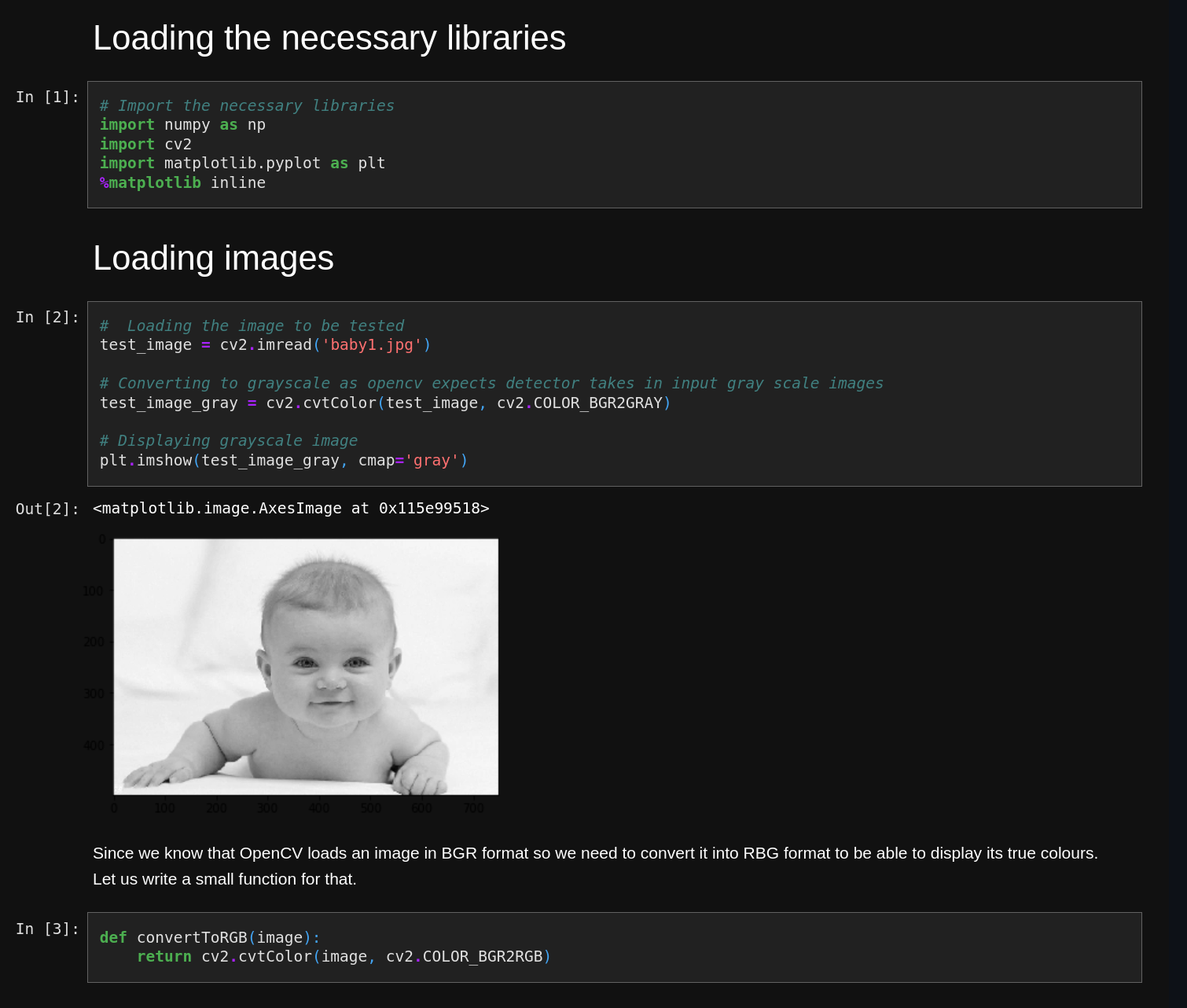
It’s mostly code and text, but the notebook has four (quite small) images embedded in it. The raw source code then looks like this:
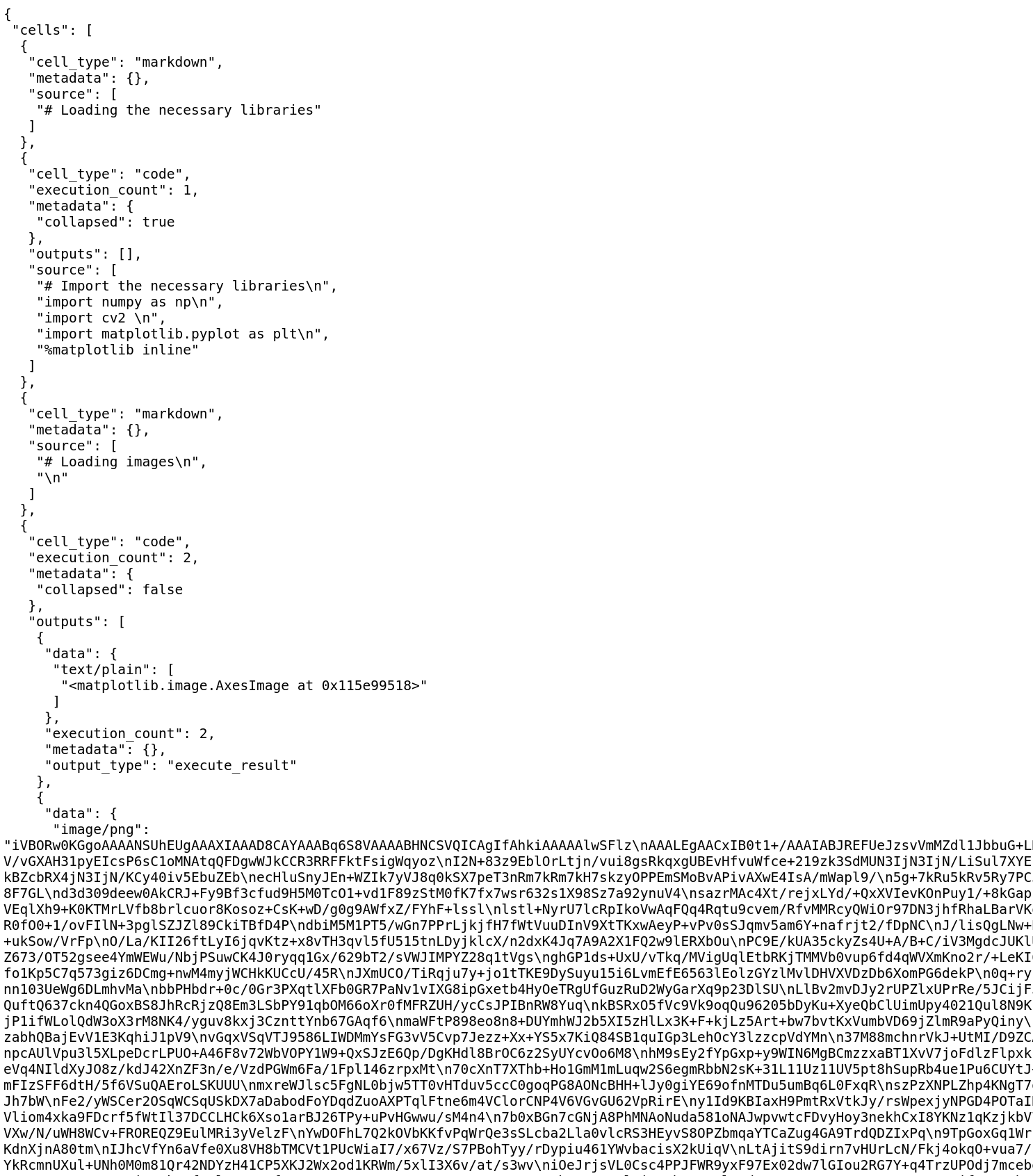
You can see that it quickly turns into a giant block of data. That goes on for pages and pages. The notebook is 524KB total and nearly all of that is those images.
If you split it into 500 character chunks, you get 1081 total chunks and all but 26 of them are base64 encoded image data. This test file in particular, when we tried to import the (very small) repo containing it, was taking over 20 minutes to index and consuming a lot of memory and CPU in the process.
In other words, all but about 2% of the file is complete garbage as far as we’re concerned. But we care about that 2% of interesting code and text, and we don’t want to throw that out.
We discussed a few possible approaches at the time. If we were confident that we’d only encounter situations like this with Jupyter notebooks, we could probably do some parsing and find blocks with ”data” and ”image/png” fields and drop them. I know this problem won’t be limited to Jupyter notebooks though. I’ve seen plenty of YAML files with base64 encoded blocks of text (SSH keys, certificates, etc.) and many documentation formats “conveniently” embed images in a similar way using base64 encoding and data: URLs in the file. I wanted a general purpose solution that would work reliably without us having to play whack-a-mole with every new kind of file we encounter.
The solution we landed on and still use is to split the file into chunks as we usually do, then calculate the Shannon entropy of each chunk:
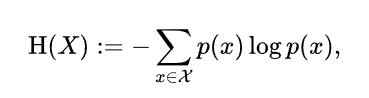
That basically gives us a number saying how “random” that chunk is. Natural language and code has structure and regularity to it and should be relatively less “random” than binary data like a base64 encoded image.
The python code to calculate the entropy wasn’t too hard to write:
def entropy(text: str) -> float:
    # get probability of chars in string
    prob = [float(text.count(c)) / len(text) for c in set(text)]

    # calculate the entropy
    return -sum([p * math.log(p) / math.log(2.0) for p in prob])
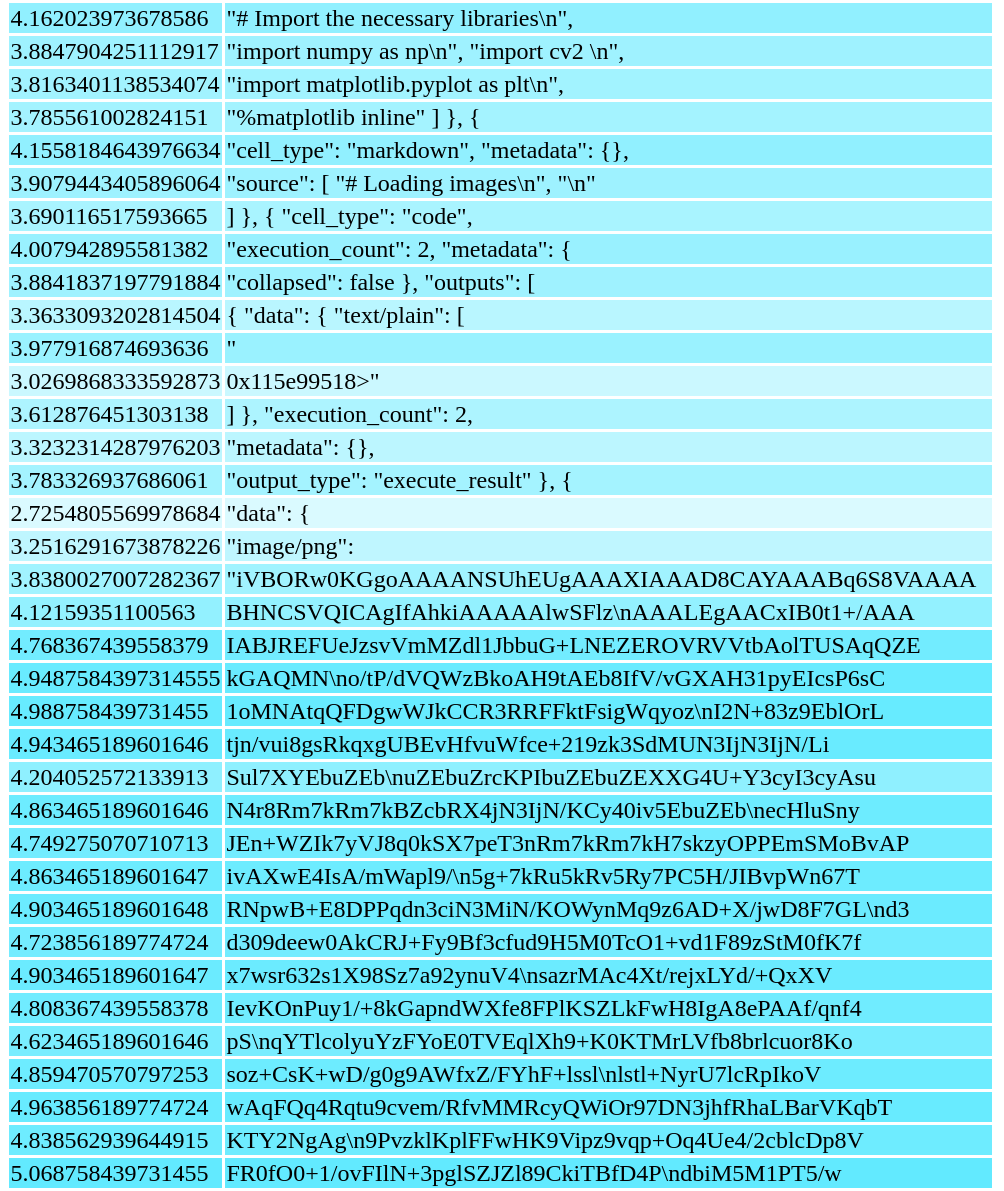
I split the notebook the usual way and calculated the entropy of each chunk. To visualize it, I printed it out as a basic HTML table withthe entropy and contents of each chunk in each row (and I added some color to make it easier to see; darker background is higher entropy). The result:
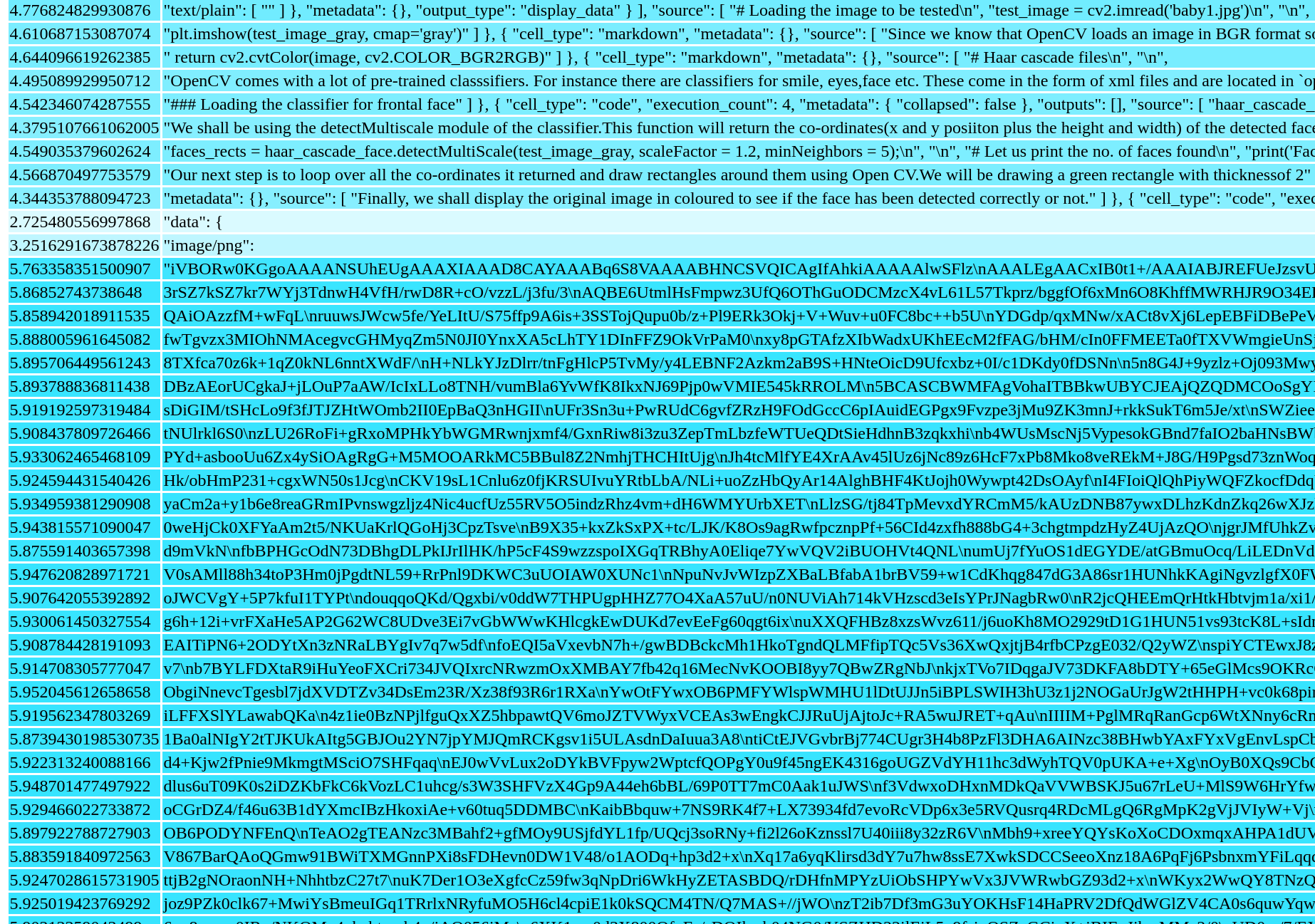
You can clearly see that the chunks of text and code at the top are lighter colored and have an entropy consistently below 5. Meanwhile, the darker parts, with entropy close to 6 are all the base64 encoded data. I tested this on other notebooks and files and found that it appears to be extremely reliable. The base64 stuff that we’re not interested in is almost all in the 5.7 – 6.0 range.
I did some testing with multi-lingual notebooks as well, particularly ones that were heavy on Chinese or other languages with a very different character set distribution to English. On those, I would occasionally find a chunk that went slightly over entropy of 5, but only just barely (typically something like 5.09). A threshold of 5.5 seems to be effective for identifying binary data even in multilingual files. Since text consistently falls below 5.1 and binary data consistently sits above 5.7, 5.5 gives comfortable margin on both sides. It’s what we’ve been using in production ever since.
I also experimented with different chunk sizes. It generally performed even better with larger chunk sizes, with even clearer distinctions between “good” text/code chunks and “bad” binary chunks.
With smaller chunk sizes, I was really expecting it to quickly stop working. To my surprise, it still looked pretty reasonable at 100 character chunks and almost passable with 50 character chunks (with a lower threshold):
(50 or 100 character chunks are far too small for us to ever want to use; I was just curious to see where the limits of the approach were.)
Some other good news is that this is very cheap to calculate. It depends a bit on chunk size, but for 500 character chunks, it took an average of 0.0001 seconds to calculate the entropy for each chunk (that’s 0.1ms). Compared to the cost of calculating an embedding for a similar sized chunk of text, that’s a drop in the bucket and should not be a bottleneck for a process that makes slow network calls to LLMs. (And that’s with a pretty naïve Python implementation; I’m sure it could be made even faster if you really wanted.)
Overall, I’ve been really happy with these results and this was a clear win for us. We can quickly and cheaply discard a lot of data that is expensive and slow for us to index and store and that provides next to no value to us. The process is pretty simple and robust and should work with nearly anything we throw at it, not being limited to one particular file format. It massively improved the efficiency of our RAG engine and we’ve found the technique to still be useful now as we’re building agentic workflows.